Frequently Asked Questions
Last Updated February 8, 2011.LEGACY PRODUCT - ETHERNET POWER CONTROLLER II
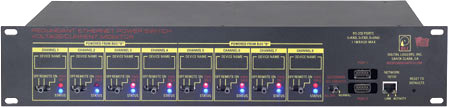
Download a users guide.
Jump to
FAQs on our new model with Power Metering.
Jump to
FAQs on our new model with Power Metering.
| Question: | What is the current version of firmware? |
| Answer: | The current version is on the update page Find the revision history here, and firmware update instructions here. |
| Question: | I have on earlier PC-8000 model. Where can I find information? |
| Answer: | For firmware information on PC-8000 units without power metering, click here. |
| Question: | How can I control and customize the LCD display? |
| Answer: | The LCD can be used to display current and voltage settings, outlet status, or any message of your choice. You can operate the LCD in "billboard" style, displaying a series of user defined messages. To customize the LCD, you'll want to write a script using our BASIC scripting language. You can also use the display to send messages from remote systems (ie. service alert warnings). To send messages remotely, write a script first, saving it in EEPROM then start the script from your remote system. Learn more about scripting here. |
| Question: | What is the default IP address? How do I reset to defaults? What is the default password? |
| Answer: |
192.168.0.100 To reset to defaults, use a non-conductive pen (NOT A PAPERCLIP) to click the "Reset to default" button located near the network connector. The master login "admin" and password "1234" are restored as well as the network settings. For login defaults on earlier PC-8000 units without power metering, click here. |
| Question: | How can I control the switch from my own applications? |
| Answer: |
Downloadthe latest User Utility
which includes PowerMan support for Linux. Your application can use HTTP communications.
Here are Java, .NET, Perl and C++ exampleswith source.
Windows users can download a Perl interpreter to run the script version. This script (ver 4.x) is compatible with all DLI power controllers. |
| Question: | Can you develop custom hardware for my application? |
| Answer: | Gladly. We've done this for many customers. Please call with your requirements |
| Question: | Do you support PowerMan? |
| Answer: | Yes, absolutely. The latest code is added to the tarball. Download the latest User Utility here. |