Power Controller Firmware Update
Click here if you're looking for WiFi Enabled Ethernet Power Controllers or Web Power Switch Pro Firmware.
If your controller has a place for an antenna or any of these menu options
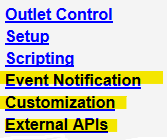
then go here for firmware updates.
This page describes the update procedure for:
- Web Power Switch versions 1-7 (LPC-LPC7)
- DIN relays versions 1-3 *
- DC and 90-240V Smart Switches
- PoE Injectors *
- Ethernet Power Controller II and III
* some DC powered products may have firmware updates locked-out with an internal wire to prevent FLASH corruption at low operating temperatures and under brown-out conditions.
Firmware revision history
Required Environment
Firmware should be updated only when a local connection is available. Firmware update over LAN/WAN is highly discouraged. Interrupting the update process can corrupt the firmware image, necessitating mail-in factory service. A direct connection is recommended. Once the update process is started, it must not be interrupted for any reason, or damage to the switch could occur. If you have enabled the PROTECT feature, you will need to physically press the reset-to-defaults switch before updating.This browser may work best:
The power controller contains both EEPROM and FLASH. EEPROM is used to store outlet states, outlet names, user logins and scripts. In most cases, EEPROM content will be unaffected by an update. If you are updating from a very old code version (before 1.2.3 circa 2010), a ~60s delay may occur while EEPROM is reformatted. Please wait for reboot. Power to outlets may be cycled on older products.
Some new features such as LCD control, serial ports, scripting require that the appropriate hardware and expanded memory be installed in your unit.
1. Disconnect Loads.

Updates may cause changes in outlet or port states (on, off or cycling)!
Play it safe.
2. Login. Check rev. Download.
Log in to the power switch as admin. Your current firmware version is displayed in the lower left hand corner of the outlet control page. Check the revision history here. Really need an update? Download 1.9.1 here. Unzip.
3. Start the Update (Browser)
Confirm you have a -DIRECT LOCAL- Ethernet connection. Enter this URL (using your actual IP).
Click on the Support link:
Then on the update link:
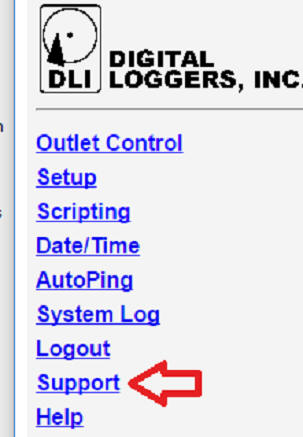

Select the .BIN file and be sure not to interrupt the process.
* If you do not have a Support link, enter this URL (using your actual IP):
Note the upper case "U" http://192.168.0.100/firmwareUpdate.htm